


Data strategy, product updates, and technical insights from the Incorta team on analytics, AI, and live enterprise data.
A 3 to 5 day data lag quietly erodes manufacturing margin through excess stock, stock-outs, and late decisions. Here's how to close the gap.

Every Monday morning, a planner somewhere opens an inventory report that was accurate on Thursday. Over the weekend, a plant shipped its excess. Another site saw a demand spike. A supplier pushed a delivery back a week. The report says nothing about any of it.
That planner will still make decisions today. They'll just make them on old information.
This is the most common data problem in manufacturing, and one of the most expensive. When your numbers run 3 to 5 days behind your operations, margin leaks out in ways that rarely show up as a single line item.
The cost of stale data spreads across the business. A few places it hits hardest:
Excess and obsolete stock. Slow-moving and obsolete (SLOB) inventory usually gets flagged during quarterly reconciliation. By then, items have aged for months and recovery value has dropped. Catching a SKU while it's still trending slow gives you options: freeze orders, reprice, bundle, or move it to a site with demand.
Stock-outs on the products that matter. Lag hides shortages until a customer order slips. Then come the expedite fees, overtime, and the phone call nobody wants to make.
Missed rebalancing. One region runs short while another sits on months of supply of the same SKU. With a two-day reconciliation cycle, the window to move that stock closes before anyone sees it.
Margin blind spots. When COGS and pricing data refresh weekly, a commodity swing or a supplier price change can run through several production cycles before finance flags it.
None of these feel like a data problem in the moment. They feel like bad luck. Look closer and most trace back to the same root cause: decisions made on last week's reality.
Most manufacturers have plenty of data. The ERP records every transaction. WMS and 3PL systems track every pallet. MES logs every run.
The delay comes from everything that happens between the source system and the decision. Data gets extracted overnight, transformed into a warehouse model, aggregated into summary tables, and loaded into a dashboard. Each step adds hours. Multi-ERP environments add days, because someone has to reconcile SAP at one plant with Oracle at another.
Aggregation causes a second problem. To make reporting fast, traditional pipelines roll detail up by region or product family. “We have 50,000 units of Product X” reads fine on a slide. It tells a planner nothing about which facility holds aged stock and which one is about to run out.
Closing the gap starts with how data moves. Incorta's Direct Data Mapping™ connects directly to ERP systems like SAP, Oracle, Workday, and IFS and creates a live digital twin of the source data. Transactions arrive in their original detail, refreshed as often as every 15 minutes, with no star schema or data warehouse build in between.
That speed changes how teams work:
Zeus Industrial Products saw this firsthand. Executive questions that used to take three weeks to answer now take three clicks. Composites One, running SAP across more than 50,000 SKUs, cut excess inventory by more than 10%.
You don't need to fix every report at once. Pick the two or three decisions where a delay hurts most, usually inventory rebalancing, SLOB review, or margin analysis. Connect the systems behind them. Measure how much faster the team acts once the data is live.
Most manufacturers find the first win pays for the next one.
Download The Shop Floor to Top Floor Manual, or bring your data questions to a 30-minute conversation with our Office of the CTO.
Incorta ranked among the top six vendors for Governance in Gartner®'s 2026 Critical Capabilities. Why governance is now the real competitive moat.

Incorta has been recognized for the fifth consecutive year in the 2026 Gartner® Magic Quadrant™ for Analytics and Business Intelligence Platforms. Among the results we are most proud of this year Incorta ranked among the 6 highest scoring vendors for Governance Use Case in the 2026 Gartner Critical Capabilities report - across all 20 vendors evaluated.
To us, that score reflects something we have long believed: governance is no longer a compliance checkbox. For enterprises running complex operational data, it is the foundation that determines whether analytics actually gets used - and trusted - in production.
Enterprise analytics projects fail more often than the industry likes to admit. Not because the technology doesn't work, or because the dashboards aren't well designed. They fail because the data underneath can’t be trusted.
A finance leader who has been burned by a report that contradicts the one their colleague pulled an hour earlier will stop using the tool. A supply chain team that cannot trace where a KPI came from will build its own spreadsheet instead. An IT organization that cannot prove audit-ready lineage from source to dashboard will block the rollout entirely.
Enterprise environments running on Oracle or SAP run into this all the time - the data is complex and vast, user expectations are demanding, and the cost of a wrong number is significant.
Governance prevents this - so why do most enterprises still treat it as an afterthought?
Governance in enterprise analytics is less of a feature, more of an architectural commitment. When your data comes from Oracle or SAP, the security models, the business definitions, and the data lineage all need to be inherited from the source - not reconstructed on top of it. That is what Incorta was built to deliver.
We feel this year's recognition highlights the depth of that commitment across four capabilities that together define what governed analytics looks like in practice:
4-Layer Security: Row-level, column-level, object-level, and data classification security -with permissions inherited directly from Oracle and SAP rather than manually mapped in the analytics layer. When a user's access changes in the source system, it is reflected immediately in Incorta. There is no secondary security model to maintain and no risk of the two falling out of sync.
Certified Business Views: A single trusted definition for every metric across the organization. Revenue means the same thing to the CFO as it does to the regional sales lead. Inventory turn is calculated consistently whether it appears in a finance dashboard or a supply chain report. Certified business views eliminate the competing definitions that quietly undermine confidence in analytics platforms over time.
End-to-End Data Lineage: Full lineage from source ERP system to dashboard - traceable, auditable, and available out of the box. When a regulator asks where a number came from, or when an analyst needs to understand why a metric changed, the answer is available without a forensic investigation. This is not a feature most platforms offer at the depth enterprise compliance teams require.
Crowdsourced Trust Layer: Business users can rate, review, and flag data quality on certified views - giving data teams a continuous feedback loop on what is working and what is not. This shifts data confidence from a centralized IT responsibility to a shared organizational practice, and it surfaces issues before they become decisions.
Gartner evaluates Analytics Governance across all 20 vendors in the report - platforms with significantly larger market share, broader global footprints, and extensive enterprise sales organizations. Incorta ranked among the 6 highest scoring vendors for Governance Use Case.
To us, that reflects a deliberate product philosophy. Incorta was not built as a general-purpose BI tool that added governance capabilities over time. It was built for complex enterprise ERP data from the ground up -which means governance is not a layer on top of the platform. It is the platform.
For enterprises in finance, healthcare, and manufacturing - where compliance is non-negotiable, and data errors have real consequences -that distinction matters more than quadrant position.
The analytics market is moving fast. AI capabilities are being added to every platform, natural language querying is becoming table stakes, and vendor positioning is shifting quickly - as this year's Magic Quadrant illustrates, with AWS entering the Leaders quadrant, Databricks making its first appearance, and several established vendors declining on Ability to Execute.
In an environment where features converge rapidly, governance is the capability that is hardest to replicate. It requires architectural decisions made early, deep integration with source systems, and a sustained commitment to the trust layer that makes analytics usable at scale. Platforms that prioritize speed to market over structural integrity will struggle to close that gap retroactively.
For the enterprises evaluating analytics platforms in 2026, the question is not only which vendor has the most capabilities - it is which vendor's platform will still be trusted by business users a year after go-live.
That is the competitive moat governance builds - and it’s why we believe this score is the most meaningful result in this year's evaluation.
Get your own copy of the 2026 Gartner® Critical Capabilities here.
-----------------
Gartner and Magic Quadrant are trademarks of Gartner, Inc. and/or its affiliates.
Gartner does not endorse any company, vendor, product or service depicted in its publications, and does not advise technology users to select only those vendors with the highest ratings or other designation. Gartner publications consist of the opinions of Gartner’s business and technology insights organization and should not be construed as statements of fact. Gartner disclaims all warranties, expressed or implied, with respect to this publication, including any warranties of merchantability or fitness for a particular purpose.
Gartner, Magic Quadrant for Analytics and Business Intelligence Platforms, Anirudh Ganeshan, Christopher Long, Edgar Macari, 29 June 2026.
Getting AI into production depends on the operational data underneath it. Lessons from our Context-Driven AI webinar on building that foundation.

Enterprises stall on AI in production because the data reaching the model is fragmented, stale, and flattened. The record of a single order is spread across the ERP, the CRM, and the fulfillment system. Batch is the default - and batch means your agent is reasoning about last night. Flattening is the one people underrate. Pre-aggregation is where the answer to "why" quietly disappears.
Every one of these ends the same way: The AI answers with confidence about a version of the business that no longer exists.
I use three words for it: live, detailed, and connected.
Live means current at the time of the question. Fresh-ish does not count. Detailed means the lowest level, and that is a requirement. If an agent is asked why margin moved from one number to another, it can’t answer from a monthly total. Connected means the relationships between your systems are part of the context itself. Miss one, and everything above it inherits the gap.
Everyone agrees you need structured, unstructured, and real-time data together. In practice, the structured operational data is the blocker. The reason has nothing to do with size. ERP schemas were built for writing transactions; they run thousands of tables deep, and every conventional route out of them flattens the data.
Documents, tickets, logs, and clickstreams are easier to land by comparison. I'm not saying those layers are unimportant, or that they are simple. ERP is just the one that stalls the entire project, so it gates the rest.
Our systems of record are read directly and delivered to the AI layer. That middle box is Incorta: you don't have to reshape anything in advance, and you don't rebuild a pipeline every time the business adds a requirement, adds an entity, or changes a process. You’re connected right to live, detailed data from the source system.
Direct Data Mapping™ makes that work. It keeps your data at full fidelity, with the speed to query it, so you or your agent can drill to the smallest level with no lag.
One of my most used examples is our customer, Broadcom - they took complex data across 26 business units and consolidated it into one layer. They were able to cut data pipeline costs by 80%, and took reporting wait time from twelve weeks to nearly instantaneous. They also streamlined their SKU down to about 500 queries: about 17,000 Broadcom users log in to Incorta every day to get the data (and context) they need to do their jobs. (You can read more here)
Think about your foundation before you build the stack. Mastering and quality matter, and so does search. Each of them needs something current, clean, and connected underneath.
Watch the full session here:
Originally posted on CFODive.com. AI is making it easier for finance to connect the dots, but better forecasting still depends on people who understand the business, tech executive Mike Nader writes.

See original article on CFODive here.
Ten years ago, it would have been unusual to see a data and analytics leader reporting to the CFO. Today, that is much more common.
That is not an accident. It reflects how much the role of finance has changed.
Finance is still responsible for explaining what happened. That part has not gone away. But, increasingly, finance is also being asked to explain why it happened, what changed and what the business should do next.
The last point in particular represents a fundamental shift for finance, which historically has focused on reporting past performance with limited visibility into real-time business signals that could reshape the outlook.
Consider this example: At a manufacturing plant in Peoria, Illinois, a supplier misses a shipment of tubing needed for a packaging line. Production keeps running, but not at the rate the plan assumed. Throughput falls to 80% of forecast.
The operational problem is obvious inside the plant; the financial impact may not be obvious for weeks.
Finance will eventually see it. Revenue will come in lighter than expected. The forecast will miss. Someone at corporate will ask what happened.
The answer was sitting inside the business the entire time.
Finance has spent years getting very good at producing accurate, repeatable reporting. That work still matters. But the real value is no longer in producing another version of the same report. The value is in understanding what the numbers are telling you and how the business should respond.
Today, the need to recognize operational signals quickly is more critical than ever. Tariffs are changing cost structures. Supply disruptions are altering production plans. Shifting demand patterns are making the task of financial forecasting more difficult. A forecast that looked reasonable two weeks ago can become stale before the month is over.
The current environment gives finance a chance to rethink processes that were built for a time when every new question required another extract, another spreadsheet, another reconciliation, or another meeting. Many of those processes made sense when the cost of getting to detail was high. The question is whether they still make sense now.
This is why I think much of the conversation around artificial intelligence in finance misses the point.
AI does not magically create business insights from thin air. What it can do is help finance arrive at answers faster. But that only works if the underlying information is accessible and trusted.
It also requires judgment. That’s why I don’t get excited about someone who is great at building pivot tables. I can generate 10,000 Excel workbooks. That is not the scarce skill anymore. What I need is someone who understands the business.
The best forecasters I have worked with were not necessarily the people who spent the most time in Excel. They were the people who understood how the business actually operated.
They knew when a supplier issue was going to create a downstream problem. They knew when demand was behaving differently than it should. They knew when a number looked wrong because it did not match what they were hearing from customers, seeing in the operation or sensing from the market.
That judgment is becoming more important, not less.
The rise of AI has simply given finance more capacity to focus on higher-value work.
A lot of the routine work around data gathering, validation and report production can now be automated. That does not make finance professionals less valuable. It changes where they add value.
The differentiator is not who can build the most complex spreadsheet. The differentiator is who understands the business well enough to recognize when something is changing and what that change is likely to mean.
Finance has been very good at explaining what happened. The opportunity now is to understand why it happened while there is still time to act.
SAP ECC support is ending. What it means for your business and your data, plus the steps to take now.
Mainstream maintenance for SAP ECC 6.0 Enhancement Packages 6 through 8 ends December 31, 2027, and Enhancement Packages 0 through 5 already lost mainstream maintenance at the end of 2025. After 2027, you can pay for extended maintenance through 2030, qualify for a limited RISE-only option through 2033, or fall back to reduced support. Every path leads to the same decision: plan your move to SAP S/4HANA. This article covers the dates, your options, the migration paths, and what happens to your data along the way.
SAP ECC (ERP Central Component) is the core of SAP Business Suite 7. It has run finance, supply chain, manufacturing, and HR for thousands of companies for about two decades. SAP is ending mainstream maintenance for it on December 31, 2027.
Mainstream maintenance covers the security patches, legal and regulatory updates, and full support that keep an ERP current. SAP leadership has repeatedly said the 2025 and 2027 end of mainstream maintenance dates for ECC 6 are not changing. Rimini Street
ECC keeps running after December 31, 2027 - what changes is the support behind it. Users have three options:
1. Extended maintenance (2028 to 2030). Companies can buy optional extended maintenance through the end of 2030, which adds three years of support at two percentage points on top of the existing maintenance fee. It covers security patches and limited legal updates. It adds no new features. IBsolution
2. The SAP ERP, private edition, transition option (to 2033). This option lets a select group of large, complex customers keep running ECC under a managed cloud subscription through the end of 2033. The conditions are strict. Eligible organizations must move relevant systems to SAP ERP Private Edition on the HANA database before the end of 2030, hold a RISE with SAP contract, and purchase the option under a fee-based plan. It is not a general extension of ECC support, and most mid-size companies will not qualify. SAP ECC End of Life 2027: What CIOs Need to Know Now +2
3. Customer-specific maintenance. This is the default if you do nothing. Its scope is much smaller, with no guaranteed new security patches or legal updates, so most organizations treat it as a last resort. Qyrus
For most SAP customers, yes. Extended maintenance and the transition option add time. The move to S/4HANA stays on the roadmap either way. The real question is when you start and how you'll keep the business running during the project.
Longer than most teams expect. Most S/4HANA migrations take 12 to 24 months, and full projects run 18 to 36 months once data and integrations are included. That means a company starting in late 2026 is already working against the 2027 date. Doodex
Adoption is also behind the deadline. At the end of 2024, only about 39% of ECC customers had licensed S/4HANA (Gartner, via CIO). As 2027 gets closer, experienced migration partners get harder to book and more expensive.
There are three common approaches.
The right choice depends on how customized your ECC system is, how much history you need, and how much process change you want.
This is the part most migration plans underestimate. It shows up in two ways.
Reporting can break during the move. Your dashboards and reports are built on ECC's data model. When that model changes, reports stop updating or need to be rebuilt. For a stretch measured in quarters, finance, supply chain, and operations can lose a clear view of the business.
Historical data can become hard to reach. A greenfield S/4HANA system often starts without your full ECC history. Once ECC is turned off, years of transactions can be hard or expensive to access. That's a problem for audits, compliance, and trend analysis.
Incorta connects directly to both SAP ECC and S/4HANA, so your reporting stays live the whole way through the migration. It keeps years of ECC history available after the system is turned off. It also gives you real-time analytics on your SAP data today, so you can migrate on a timeline that works for you.
Find out where your data stands before the migration starts. Get the SAP Migration Guide here.
Incorta earned 15 G2 badges in Fall 2026, including Easiest Setup, Easiest Admin and Easiest To Use in Enterprise Data Preparation.
G2 publishes its reports four times a year. Placement comes from verified reviews written by people who use the product at work, scored on satisfaction and market presence. Vendors cannot buy a badge.
Here are the headline recognitions from this quarter:
Fifteen badges in total, spanning four data and analytics categories.
The three usability badges came from the same category and the same segment: Enterprise Data Preparation, scored by reviewers at companies with more than 1,000 employees. Those are the environments where data platforms usually get hard. Dozens of source systems. Years of customizations in ERP. Security models that took a decade to build.
Enterprise data prep has a reputation for long deployments and heavy administration. Teams budget quarters for a rollout and then staff a small group to keep the pipelines healthy. Winning Easiest Setup, Easiest Admin, and Easiest To Use in that segment says the day-to-day experience holds up under real enterprise conditions.
The reason traces back to how the platform works. Incorta reads data directly from source systems and keeps the original detail intact, so teams skip the modeling and transformation layers that make traditional stacks slow to stand up and expensive to maintain. Fewer moving parts means a shorter path from connection to first dashboard, and less work to keep everything running after go-live.
The badges land in four categories that most vendors treat as separate products: Data Preparation, Analytics Platforms, Data Fabric, and Data Science and Machine Learning Platforms.
That spread matters for buyers. A typical modern data stack stitches together an ingestion tool, a warehouse, a transformation layer, a BI tool, and a separate environment for data science. Every handoff adds cost, latency, and one more place for numbers to drift apart. Being recognized in all four categories at once reflects a platform that covers that ground in one place, on live data, with the detail preserved end to end.
For teams building AI on top of their data, the same point applies. Models and agents are only as good as the data underneath them. A platform that already handles preparation, delivery, and analysis gives AI a single, governed source of context instead of five partial ones.
The Momentum Leader badge in Data Preparation and Analytics Platforms measures growth. G2 calculates it from review velocity, satisfaction trends, and market signals over time, which makes it a read on where a product is heading rather than where it has been.
Two Momentum Leader badges alongside four High Performer badges tells a consistent story: customer satisfaction is high, and more customers keep arriving.
G2 badges come from verified user reviews. Reviewers confirm their identity, describe their company size and role, and answer detailed questions about the product.
Because scoring resets every quarter and recent reviews carry more weight, badges reflect how the product performs now.
Analyst reports tell you what a firm thinks of a vendor's strategy. G2 tells you what the people running the software say about it after go-live. Both are useful, and they answer different questions.
If your shortlist includes platforms that promise to unify data preparation, analytics, and AI, three questions are worth asking every vendor: how long until the first working dashboard, how many people it takes to administer once it is live, and whether business users can answer their own questions without filing a ticket. The Fall 2026 badges are Incorta customers answering those three questions.
Read the reviews behind the badges on Incorta's G2 profile, or book a demo to see how fast a live enterprise data environment comes together.
Incorta and Google Cloud turn systems of record into a foundation for analytics, Gemini and AI workflows that support real-time decisions.
Most enterprise data platforms were designed to answer a question: What happened?
But AI is increasingly being asked a different one: What should happen next?
Take a simple example. A dashboard can tell you inventory is running low. An AI-powered workflow might recommend a reorder, identify at-risk suppliers, and surface downstream impacts before they affect the business. Those outcomes depend on access to the operational data that reflects what is happening across the business right now.
As organizations move from reporting to AI-driven workflows, operational systems are becoming more than systems of record. ERP, finance, supply chain, and other operational systems contain the signals that reflect what is happening across the business right now. Making that data available to analytics and analytics and decision-support workflows is becoming critical as organizations look to respond to changing business conditions in real time.
Incorta helps organizations bring live ERP and operational data from systems such as SAP, Oracle, Workday, and NetSuite into BigQuery while preserving the relationships, hierarchies, and business rules embedded within those systems. Using Direct Data Mapping®, Incorta maintains the structure of source applications, reducing the need for extensive transformation and modeling before data can be used across reporting, machine learning, and AI initiatives.
On Google Cloud, BigQuery becomes an operational foundation where Gemini and AI-driven workflows can work from the same trusted business data. Instead of relying on separate data pipelines for reporting, forecasting, and operational workflows, teams can work from a common foundation that reflects current business conditions and keeps decision-support systems aligned.
That allows AI to operate on current business signals rather than historical snapshots. It can help identify potential supply chain disruptions as conditions change, recommend inventory actions based on current demand signals, surface financial risks before they escalate, or initiate next-step actions directly within business workflows.
The value of operational data extends beyond reporting and visibility. It creates the foundation for systems that can increasingly support decisions and actions using the same trusted business context that powers analytics today.
For data and AI leaders, the opportunity is not simply faster reporting. It is the ability to operationalize AI on top of the systems that already run the business. Instead of creating separate data architectures for analytics, AI, and future initiatives, organizations can build on a shared operational foundation that supports all three.
As AI adoption continues to accelerate, the organizations that move fastest may not be the ones with the most data. They may be the ones that can turn operational data into action.
Learn more: Explore Incorta on the Google Cloud Marketplace to see how Incorta and Google Cloud help operationalize AI on top of trusted enterprise data.
Enterprise data carries the relationships and business logic that make a company run. Learn why AI needs that context preserved from ERP to BigQuery, not just access to raw tables.
Enterprise data contains the relationships, workflows, and business logic that make organizations run. A shipment, for example, is more than just a record. It connects suppliers, inventory, forecasts, fulfillment timelines, and customer commitments. An invoice is tied to contracts, approvals, and payment terms.
As organizations deploy AI more broadly, those connections become increasingly important because AI needs to understand how the business actually works, not just what each record says. Yet the relationships that connect data across the business can become harder to preserve as information moves between operational systems, warehouses, and analytics environments. When AI can only see fragments of the underlying business process, recommendations become less reliable and harder to operationalize.
Incorta and Google Cloud help make enterprise systems usable for AI without requiring organizations to reconstruct the relationships and business logic embedded in their data from scratch.
Incorta helps organizations bring complex ERP and operational data into BigQuery without stripping away the relationships and rules that give it meaning. Using Direct Data Mapping® and its semantic layer, Incorta preserves the business structure already embedded in source systems, so teams can bring ERP and operational data into BigQuery without losing the relationships, hierarchies, and business rules that make it useful for analytics and AI.
On Google Cloud, that contextualized data becomes available in BigQuery, where it can support analytics, Gemini, and other AI-driven workloads. Instead of starting with raw replicated records, organizations start with data that retains the relationships, hierarchies, and business rules needed to make data truly AI-ready.
Together, Incorta and Google Cloud help establish a shared foundation for analytics and AI, reducing the effort required to reconstruct business logic every time a new use case emerges.
When enterprise relationships, business rules, and operational context remain intact, the same foundation can support analytics, AI, and emerging agentic workflows without requiring teams to rebuild business logic for every use case.
A supply chain model can work from the same operational context used by an AI agent. A financial forecast can incorporate the same business relationships already used for reporting and analysis. Rather than creating separate pipelines, semantic definitions, and data models for every new initiative, organizations can extend a trusted business structure across analytics and AI.
For data and AI leaders, that operational foundation creates a more scalable path to operationalizing AI. New analytics, AI, and agentic use cases can build on the same trusted data foundation rather than requiring separate pipelines, semantic definitions, or data models for every initiative.
As enterprises move beyond experimentation, helping AI understand how the business works is becoming just as important as giving it access to the data in the first place. That understanding is what enables organizations to move from reporting on the past to acting in the present.
Learn more: Download Onramp to the Integrated Data Superhighway for AI Agents to explore how Incorta and Google Cloud help create a trusted foundation for enterprise AI. Or find Incorta on the Google Cloud Marketplace to get started.
Copying data isn't enough for AI. Incorta and Google Cloud preserve the relationships, rules and context that make enterprise data AI-ready.
For years, data teams focused on making enterprise data more accessible. Data replication solved an important problem: access.
Once data reached modern cloud platforms, teams could analyze it, report on it, and build applications around it. For many analytics initiatives, that was enough.
AI introduces a different set of requirements.
Analytics and AI consume data differently. Analysts can interpret missing context, reconcile inconsistencies, and apply business knowledge on their own. AI systems rely much more heavily on the structure embedded in the data itself.
A replicated purchase order may contain all of the underlying data, but not the relationships that connect it to suppliers, inventory, approvals, and downstream business processes. When those relationships are lost, AI can still retrieve information correctly, but struggle to reason across systems, workflows, and decisions.
Incorta helps organizations bring complex ERP and operational data into BigQuery without stripping away the relationships, hierarchies, and business rules embedded within it. Using Direct Data Mapping® and its semantic layer, Incorta preserves the business structure already embedded in source systems, reducing the need to reconstruct that logic after data has been moved.
On Google Cloud, BigQuery provides a scalable environment where operational data, analytics, and AI can work from the same foundation. Google’s Gemini models and other AI-driven workloads can build on the structure already preserved within the data instead of requiring teams to recreate it.
AI-ready data becomes more valuable as organizations extend the same foundation across analytics, AI, and future workloads. By preserving business structure at the data layer, Incorta collaborates with Google Cloud to make it possible to support AI assistants, forecasting, analytics, and future agentic workflows from the same trusted foundation.
When the relationships and business rules behind enterprise data remain intact, the same foundation can support analytics, AI, and future use cases without creating new pipelines, semantic definitions, or data models each time requirements change. That means teams can spend less time reconstructing logic and more time extending a shared data foundation into new analytics and AI workflows.
For data and AI leaders, that trusted foundation creates a more scalable path to operationalizing AI. New analytics, AI, and agentic use cases can build on the same trusted business structure, reducing the effort required to bring AI into additional workflows, teams, and processes.
The value of AI-ready data extends beyond analytics. It creates the foundation for systems that can increasingly support decisions and actions across the business.
Learn more: Download Onramp to the Integrated Data Superhighway for AI Agents for a deeper look at how Incorta collaborates with Google Cloud to bridge data movement and AI readiness. Or explore Incorta on Google Cloud Marketplace to get started.
Over half of finance leaders in our poll still rely on Excel. Why the habit persists, and what it's quietly costing every team that depends on it.
During our latest webinar with Workday Adaptive Planning, we asked the audience a simple question: what data challenge is causing you the biggest headache right now? Fifty-five percent said the same thing. Their data lives in Excel or some other non-centralized source.
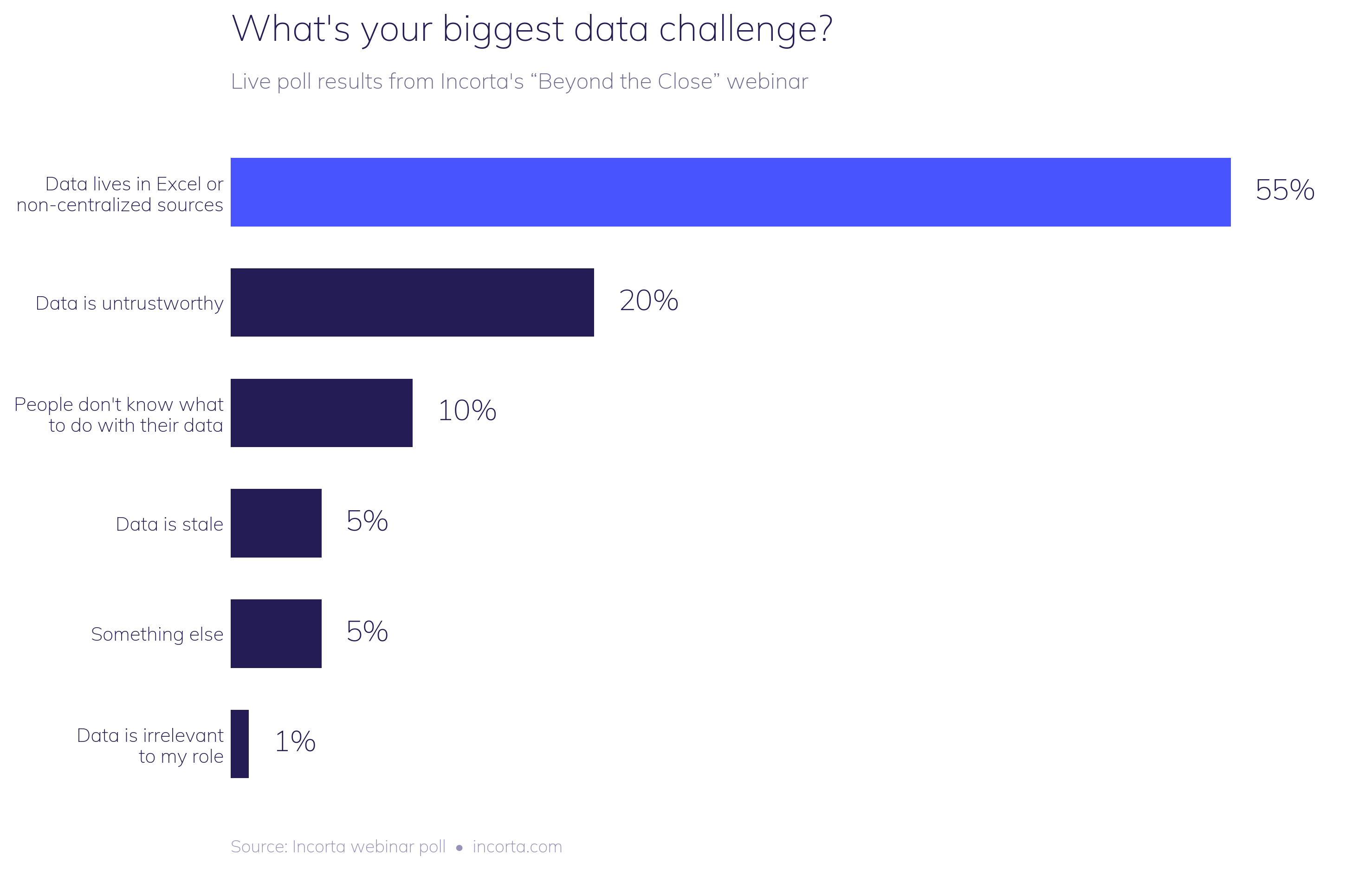
Nobody on the call was shocked. Ben Pierce, General Manager of Workday Adaptive Planning, walked through the pattern right after the results came in: a finance team needs a view their BI tool doesn't have, so they pull data out of the ERP, drop it into a spreadsheet, and spend the next several hours building VLOOKUPs and pivot tables just to get back to a starting point. Most of the effort goes into wrangling the data instead of actually analyzing it.
Analysts have been predicting Excel's decline for years. Gartner has forecast that by 2026, more than 70% of finance organizations will have moved off spreadsheets as their primary planning tool. But the Association for Finance Professionals' 2025 FP&A Benchmarking Survey tells a different story: 96% of finance practitioners still use spreadsheets weekly for planning, and 93% use them weekly for reporting, even at companies that already run a dedicated EPM platform.
Read those two data points side by side and the gap is hard to miss: trhe prediction and the reality aren't close.
And we get it! Excel is fast, familiar, and flexible in ways purpose-built systems often aren't. Nearly every finance professional already knows how to use it, so there's no training curve and no waiting on IT. When a forecast needs updating before a Monday meeting, Excel is usually the quickest way to get there.
The problem shows up later, once that spreadsheet becomes the system of record for a decision instead of a scratchpad for one.
A few things happen once Excel becomes the default workflow instead of a backup option.
Time disappears into data prep instead of analysis. The AFP numbers above aren't describing a minority workaround. They're describing how most finance teams spend most of their week, and it's rarely on the parts of the job that actually move the business forward.
Trust erodes. UK research from Sixthfin, covered by The Fintech Times, found that 67% of firms still run their financial close in Excel, and roughly a third of finance leaders admit they don't fully trust the reliability of their own close figures. When a number can't be traced back to its source with confidence, every conversation built on that number starts from a weaker position.
Errors compound quietly. Spreadsheets have no native audit trail. There's no built-in way to see who changed a formula, when, or why. A single broken link or copy-paste error can sit undetected for a full reporting cycle, and by the time it surfaces, it's already shaped a decision.
The close gets harder every month, not easier. Every one of those workarounds gets rebuilt from scratch next period. Nothing compounds in the team's favor. The same manual work just repeats.
Every attempt to force finance teams off spreadsheets by fiat runs into the same wall: Excel solves a real problem, and ripping it away without solving that problem first just pushes the workaround somewhere else.
The actual fix is giving finance direct, governed access to live operational data, so the spreadsheet stops being the only place that data can be shaped and explored. During the Incorta Builder launch webinar, this showed up directly in the forecast and planning app demo: users got an editable, grid-based planning interface that felt like Excel to work in, drag, fill, adjust assumptions, but every number underneath it was live, governed, and tied back to its source. Saving a plan wrote directly to the underlying database instead of creating another disconnected file that only one person understands.
That's the shift: not eliminating the spreadsheet experience finance teams are comfortable with, but connecting it to a foundation where the data is trustworthy, current, and traceable by default.
One in five finance leaders say untrustworthy data is their biggest challenge. Here's why trust breaks down, why AI exposes a weak data foundation, and what trustworthy data really requires.
At Incorta's "Beyond the Close" webinar, 20% of attendees pointed to untrustworthy data as their biggest challenge, right behind the 55% stuck in Excel. Twenty percent might sound manageable next to a majority-vote problem. It isn't. It means a meaningful share of finance leaders are making decisions on numbers they don't fully believe, and saying so out loud in a room full of peers.
Mike Nader, Field CTO at Incorta, put the underlying issue plainly during the session: finance and accounting teams have to be able to communicate in a common way, and that starts with agreeing on what a number actually means. Without shared rules and shared context, two people can look at the same figure and mean two different things by it.
Data doesn't become untrustworthy on its own. It happens gradually, through a specific set of failures that show up in almost every finance function at some point.
Systems get connected by hand instead of through a governed pipeline, so every export is a fresh opportunity for something to drop or duplicate. Business rules live in someone's head, or in a spreadsheet formula nobody's touched in two years, instead of in a place the whole team can see and reference. There's no lineage, so when a number looks off, nobody can quickly trace it back to the transaction that produced it. And definitions drift. One team's "active customer" is another team's "customer with an order in the last 12 months," and nobody notices until the two reports don't match.
Any one of these is manageable. Stacked together, they're exactly why a fifth of a finance audience will say out loud that they don't trust their own numbers.
Cloudera's 2026 Data Readiness Index surveyed 1,270 IT leaders and found that while 85% believe they have a clear data strategy, only 18% consider their data fully governed. Informatica's CDO Insights 2026 study of 600 global data leaders found that 76% say their organization's AI governance can't keep pace with how employees are actually using AI day to day. And Grant Thornton's 2026 AI Impact Survey found that 78% of business executives lack confidence they could pass an independent AI governance audit within 90 days.
The same governance gap showing up in finance teams' Excel workflows is showing up across every function racing to adopt AI, and finance has more exposure than most, because nearly every decision in a company eventually shows up as a financial outcome.
Point an AI model at ungoverned, disconnected data and it won't hesitate the way a skeptical analyst would. It'll answer confidently, using whatever pattern it finds, whether or not that pattern reflects what's actually happening in the business. The output looks polished. The trust problem is just harder to see until something goes wrong.
Fixing this isn't about finding a smarter model. It's about giving finance a data foundation that's governed at the source, not cleaned up after the fact.
That means data landing exactly as it looks in the system of record, with no undocumented transformation on the way in. It means rules and business logic applied consistently, in a shared semantic layer instead of scattered across individual spreadsheets. It means every number staying traceable, so a finance user can walk from a summary figure back to the line-level transaction that produced it, in a few clicks, without filing a ticket. And it means that same foundation, and the same governance, applying whether a person is asking the question or an AI agent is.
That last point matters more every quarter. An agent answering a finance question needs to inherit the same row-level security and the same audit trail a human user would get from a dashboard. Otherwise, adding AI just adds a new, faster way to act on bad data.
Finance teams didn't lose trust in their data because they weren't paying attention. They lost it because the systems underneath weren't built to keep pace with how fast the business changes. Closing that gap takes a foundation that's governed from the moment data lands, not a faster way to query whatever's already there.
Finance teams plan with data that's already out of date. How the Adaptive Data Foundation, powered by Incorta, closes that gap in Workday Adaptive.
Plan faster. Explain more. Help the business respond to change in real time. That's the standing request most finance teams are working under right now, and it's a hard one to meet when the data behind the plan is still catching up to what's actually happening in the business.
Incorta powers the Adaptive Data Foundation to close that gap. It's a finance-owned data layer, purpose-built for Workday Adaptive Planning, that connects ERP systems, CRMs, HRIS platforms, and operational planning tools directly into Adaptive, with data refreshing as frequently as every five minutes.
Intelligent planning rests on three things: data readiness, access to rich actuals, and a real connection between plans and the decisions that come out of them. When any one of these breaks down, planning slows, trust erodes, and the decisions that follow lose their footing.
Most FP&A teams don't actually lack data. They lack the right data, at the right level of detail, at the right time. The problems show up the same way almost everywhere: actuals that arrive after the close, operational plans that never connect back to the financial model, and granular detail that's out of reach exactly when analysis needs it most. Adaptive Data Foundation is built to solve those three problems in a single layer.
Adaptive Data Foundation runs on Incorta's Direct Data Mapping® technology and includes pre-built blueprints for Workday Financial Management and other enterprise platforms. It delivers full transaction-level access and keeps that data current in near real time, so finance isn't working from a periodic extract or a static summary. They're working from live, analytics-ready data that both people and AI agents can use directly.
What sets it apart from a typical enterprise data platform is who's in control. Adaptive Data Foundation is owned and operated by finance, not IT. FP&A teams can add data feeds, update definitions, and change models on their own timeline, without submitting a ticket or waiting on a backlog. For organizations that already have a mature data platform, it runs alongside it. For those that don't, it's the foundation that gets built in its place.
That live layer is what drives everything downstream. Operational signals, revenue run rates, pipeline shifts, headcount changes, inventory levels, spend commitments, feed continuously into forecasts, scenarios, and decisions, so the plan stays aligned with what's actually happening in the business instead of drifting further from it every week.
Behind the scenes, Incorta handles the complexity of pulling data across many source systems. What it publishes to Workday Adaptive is a clean, planning-ready view with full lineage and traceability built in. That's what makes it possible to expose rich, transaction-level actuals to planning without dragging all of that underlying complexity along with it.
Connecting Workday Adaptive to Adaptive Data Foundation comes down to configuration, not custom development. A team selects one view as the data source, GL balances, for example, and can select a second view as a drill-through target for deeper detail, like the journal lines behind those balances. Once that pipeline is in place, rich actuals flow straight into the plan.
From there, a planner can drill from a summary variance straight down to the originating transaction with a single click, without ever leaving Workday Adaptive or submitting a data request. The answer comes back inside the same workflow, so it's immediate and stays in context. When the next question comes up, and it always does, the same detail is already there. A user can start at a balance, move into journal lines, drop to customer-level detail, and see the order activity behind it, all without rebuilding a report or leaving the flow they're already in.
Adaptive Data Foundation isn't limited to reports and dashboards. The same governed framework is accessible agentically. An AI agent can discover the underlying schema, understand the business context around it, and answer complex questions in natural language, all against the same governed data a human analyst would use. AI-driven variance analysis can surface the operational driver behind a change instead of just the number, and AI-assisted scenario planning can incorporate live signals to generate and continually test forward-looking scenarios.
That means one foundation supports dashboards, planning, drill-through, and AI agents alike, without spinning up new pipelines or duplicating data for each use case. It simplifies access today, and it keeps the foundation ready for however your uplanning workflows keep evolving.
Watch the full demo here: