Tools and Utilities

Enhanced Audit

Provides comprehensive visibility into the system activities and usage patterns, enabling better troubleshooting and performance analysis.

After upgrading to 2024.7.x, Incorta records user activities in both files by default. However, you can specify one type of them to use. In the Cluster Management Console (CMC) > Clusters > your_cluster > Server Configurations > Analytics Workload Management, for the Analytics Auditing option, specify if you want to log activities in the Standard audit files, the Enhanced ones, or Both.

To start logging user actions in the audit files, Incorta requires at least one of the actions it tracks, such as opening a dashboard or downloading an insight, to be executed manually or via a scheduled job.
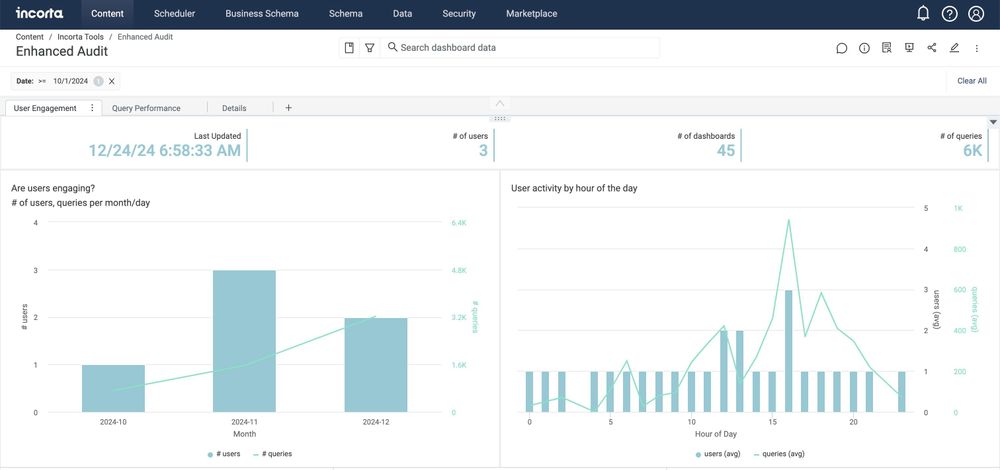
Dashboard showing user engagement and activity with bar and line charts for queries and users over months and hours.
Dashboard analytics with bubble chart, scatter plot, donut chart, and tables of user query stats and dashboard times.
Incorta Enhanced Audit dashboard showing query performance charts, cache hit ratio, and top 10 insights by query time.
Dashboard showing top 10 dashboards and insights by max query time and memory use with detailed tables and bar chart.
Incorta dashboard showing enhanced audit action timings and performance data with a task-wise timing bar chart.
Dashboard showing Enhanced Audit with API_RENDER tasks for Booking Billing and Backlog in JSON format.

See Incorta in action